728x90 Ad Space

Sign Up To The Free Email Newsletter!

Want to get notified whenever we produce the latest content ? Then subscribe now to start receiving hot updates from today.

Saturday, April 19, 2014

Clean Master - Free Optimizer v5.3.0 build 50301311

Clean Master - Free Optimizer v5.3.0 build 50301311
Requirements: Varies with device
Overview: Clean Master is a Free, top-rated all-in-one cleaner app for Android™ devices.

[break]
Description
Simple, Thorough and Safe, Clean Master is the world's most downloaded Android optimizer, memory & speed booster, and security/antivirus suite brought to you by Cheetah Mobile (formerly known as KS Mobile).

It is unmatched at improving device performance, removing junk and spam files and protecting against malware, trojans and viruses.

Join over 200,000,000 people who have already installed this complete optimization manager, Clean Master! We are here to fix all your device problems, whether it's lagging, running low on space, or infected with malware.

Highlights of Clean Master - Optimization & Antivirus

☆ Thorough: The junk-creating behavior of millions of apps has been analyzed so that Clean Master can efficiently hone in on its targets (cache and residual files) with perfect accuracy.
☆ Fast & Intuitive: Simple to use, super-fast and smooth UI, plus cool transition effects
☆Ranked #1 by AV-TEST, providing professional security protection. Scanning takes only 5 seconds, 500% faster than other paid antivirus apps.

Features of Clean Master- Optimization & Antivirus

► JUNK FILE CLEANING
Delete cache and residual files to reclaim memory and improve performance on your device and SD card.

► MEMORY BOOST
Boost all games and running apps, free up memory (RAM) and speed up your device. Our One-Tap Boost and Game Boost features make it easy to optimize directly from your homescreen.

► SECURITY & PRIVACY
Scan the system, pre-installed and user-installed apps to keep your device safe from viruses, trojans, vulnerabilities, adware and spyware. Remove personal and sensitive information to protect your privacy.

► APP MANAGER
Uninstall unwanted apps or bloatware and back up important ones. Some rooted devices will be able to move apps to the SD card as well as uninstall pre-installed and system apps. Our own App Picks lets you find useful apps that match your interests.

Stay connected!

Join our Google+ community: https://plus.google.com/communities/...77658392172082
Join our Facebook community: https://www.facebook.com/kscleanmaster
Follow us on Twitter: https://twitter.com/kscleanmaster

Other apps from Cheetah Mobile on the Play Store

Battery Doctor (Battery Saver):
http://ksmobile.com/product/battery-doctor.html

CM Secure Browser -Fast & Safe:
https://play.google.com/store/apps/d...om.ksmobile.cb

--
Supported languages

Arabic, Bulgarian, Chinese, Croatian, Czech, Dutch, English, French, German, Greek, Hebrew, Hungarian, Indonesian, Italian, Japanese, Korean, Norwegian, Polish, Portuguese, Romanian, Russian, Serbian, Slovak, Spanish, Thai, Turkish, Ukrainian, Vietnamese, Hindi, Malay

What's New
V5.3.0
1. Added new feature - Timeline. Your security, visualized.
2. Improved junk cleaning performance. It now scans faster and cleans more.
3. Added more solutions for the insufficient space issue.
4. Other optimizations and enhancements.

This app has no advertisements

More Info:

Code:

 https://play.google.com/store/apps/details?id=com.cleanmaster.mguard&hl=en 
Download Instructions:
https://www.oboom.com/XY1YY796

Mirror:
http://ul.to/qen4vdii
http://unlimitzone.com/xbcq2bdk8bxg/...01311.apk.html
https://www.tusfiles.net/acb2ad2k69yr

QuickSpell v2.1.92

QuickSpell v2.1.92
Requirements: Android 2.2+
Overview: Improve your typing accuracy and document editing in 40 languages with QuickSpell!

[break]
Improve your typing accuracy and document editing in 40 languages with QuickSpell!

You will be able to fix misspelled words easily, by visually locating the underlined errors and correcting them by tapping on suggested replacement words. Applications like Contacts, Calendar, Email, Facebook, etc. along with all spell-check enabled Edit fields and Views are using this functionality by default, provided that Spell Checking is enabled in System Settings.

Offered from the developer of the renowned OfficeSuite, QuickSpell provides full integration with the office productivity application.

*** How is QuickSpell better than the other spelling tools? ***
* QuickSpell offers a range of languages not available in the standard Android spelling tool.
* QuickSpell is based on the well-known and proven Hunspell engine that is used in Chrome, Mac OS X, Firefox, OpenOffice and many others.
* QuickSpell uses a number of proven spell check algorithms such as Morphological analysis, Twofold suffix stripping, Extended affixes and Homonyms, thus dramatically improving the spell check efficiency.
* The spelling dictionaries in QuickSpell are developed and supported by large community efforts.
* You can download and store locally only dictionaries that you need.
* You are able to use entries from phone's Contacts list and standard Android user dictionary.
* QuickSpell has a built-in User Dictionary Editor for your convenience.

*** Supported Languages: ***
QuickSpell is available in more than 40 languages.
Users can download and use only spelling dictionaries of their choice.

English (Australia)
English (Canada)
English (United Kingdom)
English (United States)
German (Germany)
Italian (Italy)
French (France)
Spanish (Spain)
……………………………….
Albanian (Albania)
Bulgarian (Bulgaria)
Afrikaans (South Africa)
Catalan (Spain)
Croatian (Croatia)
Czech (Czech Republic)
Danish (Denmark)
Dutch (Netherlands)
Greek (Greece)
Estonian (Estonia)
Faroese (Faroe Islands)
Hebrew (Israel)
Hindi (India)
Hungarian (Hungary)
Indonesian (Indonesia)
Korean (Korea)
Lithuanian (Lithuania)
Latvian (Latvia)
Norwegian Bokmål (Norway)
Polish (Poland)
Portuguese (Brazil)
Portuguese (Portugal)
Romanian (Romania)
Russian (Russia)
Serbo-Croatian (Bosnia and Herzegovina, Croatia)
Slovak (Slovakia)
Slovenian (Slovenia)
Serbian (Serbia)
Swedish (Sweden)
Tamil (India)
Turkish (Turkey)
Ukrainian (Ukraine)
Vietnamese (Vietnam)

*** OS Version Support: ***
* Ice Cream Sandwich Android 4.0 or higher
* The software also works on all devices having Android 2.2 and later with supported by MobiSystems apps as OfficeSuite Pro.

Warning: QuickSpell cannot work as default Android spell checker on heavily customized Android distributions, such as for example Samsung TouchWiz devices. Users with such devices might not be able to see Android Spell Check settings screen and thus not being able to benefit from QuickSpell in the built-in Android applications. However, QuickSpell will continue to work with MobiSystems OfficeSuite Pro.

Please note that on some customized Android 4.0.x device restart might be needed after the initial installation, in order for QuickSpell to appear in Android Spell Checker settings.

*** How to activate QuickSpell? ***
After installation, go to Settings->Language and input->Spell checker (if available on your device) in order to select QuickSpell as default Android spell check provider.

*** Privacy Statement ***
At MobiSystems we take your privacy very seriously – QuickSpell will never collect your personal data, like passwords or credit card numbers. Internet access permission is used to download dictionaries only.

What's in this version:
New Features in v 2.1.69
* Improvements

This app has NO advertisements

More Info:

Code:

 https://play.google.com/store/apps/details?id=com.mobisystems.spellchecker 
Download Instructions:
https://www.tusfiles.net/20suj5buxquk

Mirror:
http://unlimitzone.com/rrrqk1xb2lxp/....1.92.apk.html
http://ul.to/01j82fgn
https://www.oboom.com/O7LZ5VTK

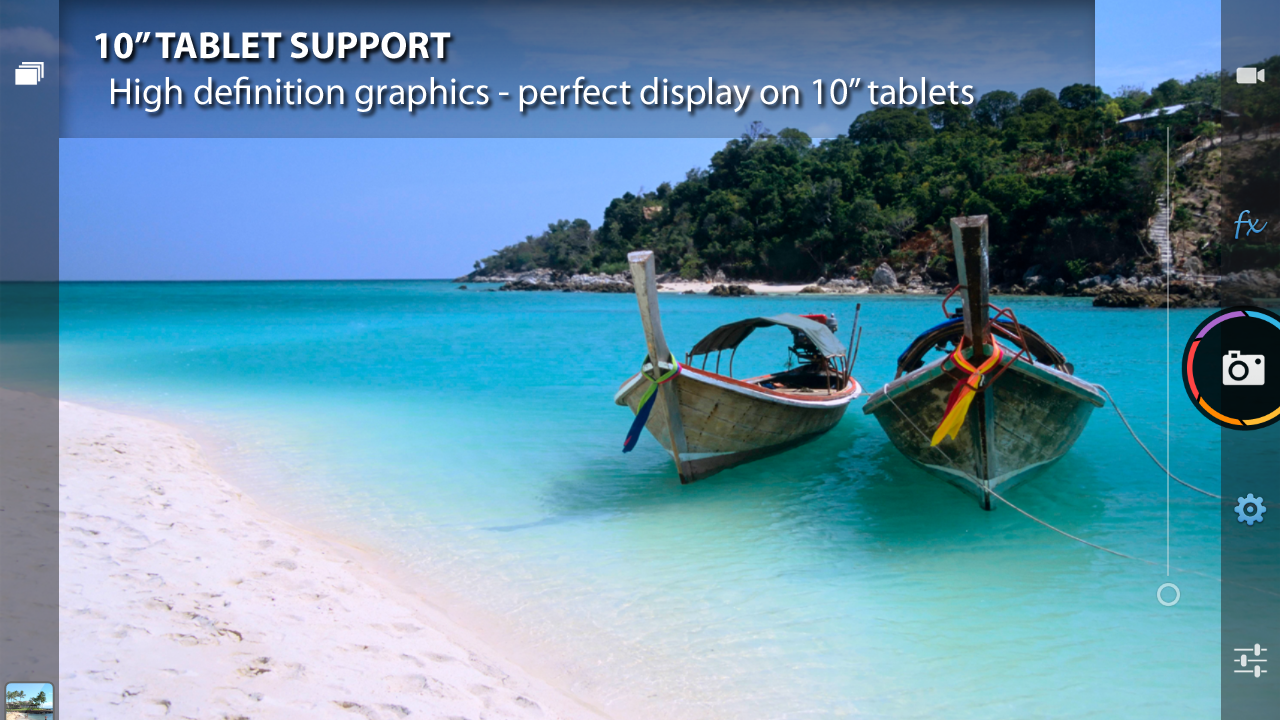
Camera ZOOM FX v5.0.7 Build 91 Update

Camera ZOOM FX v5.0.7 Build 91 Update
Requirements: 1.6+
Overview: Camera ZOOM FX v5 is HERE!!!

[break]
>> Editor's Choice - Google Play
>> "The Best Camera App for Android" - lifehacker
>> "Grab this to show off to your Apple-loving buddies" - SlashGear
>> "packed with a cubic ton of features" - USA Today
-- Over 1.7 million sold! --
★★★★★★★★★★★★★★★★
The award-winning camera app for Android devices! Camera ZOOM FX is now Editor's Choice on Google Play, Lifehacker, Gizmodo and SlashGear.
Replace all your camera / photo FX apps with just one!

★★★★★★★★★★★★★★★★
Camera ZOOM FX v5 is HERE!!!
● introducing 'Best Photo Mode'!!
OVER 20 NEW FEATURES in one huge update - see recent changes for full list!!
★★★★★★★★★★★★★★★★
POWERFUL CAMERA:
● Optical / digital zoom (pinch to zoom up to 6x)
● Fastest camera on Android - fast action shot up to 20 shots per second
● Best Photo Mode! take up to 50 shots in burst mode, and let Camera ZOOM FX decide the best, or choose for yourself!
● Front facing camera - perfect for selfies
● Customization of ALL hardware buttons
- e.g. volume buttons to control zoom, trackball to snap shot...
● Live previews of some effects, e.g. frames, buddies
● Silent camera (if device supports)
● Tweak hardware options: autofocus, whitebalance, nightshot...
● Settings for iso, focus metering, brightness, exposure, contrast, saturation, sharpness (based on device)
● Upload photo to Facebook, Twitter, Flickr, etc.
● Flash (if avail)
● Customizable grid overlays
● Horizon level indicator
● NEW!! Live Wallpaper - now "Photo FX Live Wallpaper" app

MULTIPLE SHOOTING MODES:
● Stable Shot
● Timer
● Voice Activated: take a picture by clapping, shouting...
● Burst Mode
● Collage
● Time Lapse

POST PROCESSING:
● Combine effects using non-destructive editing
● Process at full camera resolution (up to 8mp if avail)
● 10 ready made presets: Diana, Retro, Holga 35mm, Toy Camera...
● 20 Color FX: vintage, lomo, cinematic, funky, pencil...
● 15 Frames: thin, rounded, lens, polaroid, filmreel...
● 6 Vignette Surrounds: heavy, invert, spotlight...
● 12 Distort FX: fisheye (like fxcamera), mosaic, twirl...
● 9 Mirror FX
● 3 Tilt-shift FX
● 3 Textures, 5 Light Leaks, 5 Bokeh FX
● Crop to any size of your choice: 3x8, square, instant, 6x4...
● Digi composites (photoshop style overlays)
● Props and famous 'buddies' in your pictures (move and resize!)
● Create stunning collages: e.g. 2x2 passport style selfie combination shots
● Random effects

OTHER FEATURES:
● Fullscreen shutter: click anywhere on screen to shoot!
● Animated shutter effect
● Support geotag / exif tags
● Select sdcard folder to save photos (incl external sd)
● Auto save shots
● Win $100 in Instagram style photo contest
● Pro scene modes, e.g. nightshot, beach (Droid only)
● View last shot in picture gallery
● Use as default camera
● Rotate / crop photos
● Widescreen lens / capture (if device supports)
● Support from Android 1.6 through to Android 4.4 (kitkat incl tablets)
● Switch to video
● ICS, JB, Holo style UI

FREE DOWNLOAD PACKS:
● Fun props
● Frames
● Famous 'buddies' in your pictures
● Composites (paper overlays)
● Shutter animations
● Scary Halloween ghouls and ghosts

REVIEWS:
"our choice for the best app around ... a ton of different effects if you're in the mood for a Hipstamatic type shot" - lifehacker
http://goo.gl/zzCMl
"grab this to show off to your Apple-loving buddies" - SlashGear
http://goo.gl/UkANw
"greatly improves the usefulness of your Android's camera" - Gizmodo
http://goo.gl/NhnpZ
"Few apps offer as many options for shooting as this one" - WIRED
http://goo.gl/3ANqB

NEWS & SUPPORT:
To get news and updates on Camera ZOOM FX:
- Blog: http://www.androidslide.com
- Twitter: http://twitter.com/androidslide
- Facebook: http://www.facebook.com/groups/114616321297
- Flickr: http://www.flickr.com/photos/51907529@N02

ACCESS_FINE_LOCATION permission is required for geotagging photos (optional in settings)

What's New
5.0.7
- added 3 bonus Easter cards to send to friends + family!! Happy Easter!!
- bug fixes

This app has NO advertisements

More Info:

Code:

 https://play.google.com/store/apps/details?id=slide.cameraZoom 
Download Instructions:
https://www.tusfiles.net/l9p5zf08zhx1

Mirror:
http://unlimitzone.com/tigz68sd6ywn/...om_91.apk.html
http://ul.to/gkfxphrk
https://www.oboom.com/JDCXDQT5

Dolphin Browser for Android v11.0.0 Build 314

Dolphin Browser for Android v11.0.0 Build 314
Requirements: 2.2 and up
Overview: Dolphin Browser(Formerly Dolphin Browser HD) is the world's first Gesture, Sonar and Add-on enabled mobile web browser on Android.

[break]
Description
Dolphin for Android makes mobile browsing easy, surfing the web with a personalized home screen, voice and gesture control.
★ #1 Mobile Web Browser on Android Market
★ Over 100,000,000 downloads on Android and iOS
With lightning fast speed, Dolphin for Android provides you the best experience to browse and search the web. Download Dolphin Android Browser for free to surf the web with exclusive features of your very own mobile browser.

From Users
"Best browser for an Android phone: This browser offers a fast, smooth web browsing. I recommend this browser for all!" – Aziz Al-Haji
"Far better than Chrome: This is the best browser I've had to date, for more stable than Chrome and Firefox and with many more features too. Frequent updates tend to fix issues as opposed to Google Chrome updates." – Omar Davis

In the Press
Dolphin Browser's Gestures and sidebars make web surfing fast, intuitive and fun while on the go. - USA Today
"…it's a great, simple browser that feels more at home on a touchscreen device than pretty much anything else you'll try." – Lifehacker

Dolphin is my browser.
Features:
★ Gesture - Access the web by creating a personal Gesture (symbol) to you use the most.
★ Sonar – Dolphin for Android listens and lets you use your voice to search, share on your favorite social networks, bookmark favorite website and navigate.
★ One-tap Share - Tweet, Post to Facebook, grab any content and share them, or save it directly to Evernote or Box.
★ Tabbed browsing - No need to toggle between screens, tabbed browsing lets you browse as if you are on desktop.
★ Add-on – Beef up your mobile Internet browser experience by installing the Add-ons for the tasks you need at your fingertips. With more than 60 and counting, Dolphin Add-ons enables any action to be done right within the mobile browser. You can check out the Add-on features with 3 preloaded on your right Sidebar.
★ Dolphin Connect - Sync history, bookmarks, passwords and open tabs easily across Android, iPhone, iPad and desktop browsers including Chrome, Firefox and Safari.
★ Home Screen – Add most visited websites as speed dials to your home screen. And organized them easily with one touch access.
★ Theme – Customize theme colors, wallpapers and skins to make Dolphin your own
★ Web App Store - The all-new Dolphin web app store offers access to the most popular web sites so you never have to leave the browser. Choose from over 200 web apps, including Facebook, Twitter, Wikipedia, Amazon and more.
★ Send to device: Send links, maps, phone numbers, & more from your desktop to your phone and vice versa with Dolphin for Android's Chrome, Firefox and Safari extensions.**
★ WiFi Broadcast - Share links with friends nearby on your wifi network.

Note: For Android 4.3 & 4.4 devices, Dolphin Jetpack is now included within Dolphin Browser for Android. Users could manually uninstall previously installed Dolphin Jetpack.

***Download Dolphin extensions and send web pages between your mobile and desktop:
Chrome:
https://chrome.google.com/webstore/d...bjldmfcbcpdpll
Firefox:
http://dolphin-apk.s3.amazonaws.com/...hinconnect.xpi
Safari:
http://dolphin-apk.s3.amazonaws.com/...ect.safariextz
We love hearing from you. Contact us at [email protected] and rate us today!
Join Dolphin Facebook Fan page: http://www.facebook.com/DolphinFans
Follow Dolphin on Twitter: https://twitter.com/#!/DolphinBrowser
Website: http://www.dolphin.com

Some additional features that you can add to your Dolphin for Android by installing add-ons:
l Web to PDF
l Dolphin screen cut
l Browser Faster for Dolphin
l Dolphin Translate
l Dolphin Reader
l Dolphin Battery Saver
l Bookmarks Widget
l Dolphin Brightness
l Dolphin Tab Reload
l Dolphin Show IP
l Dolphin Ultimate Flag
l Dolphin: Pocket Add-on
l Dolphin Whols
l Dolphin: Dropbox Add-on
l Dolphin Alexa Rank
l Xmarks for Dolphin

What's New
[New] Menu and Tool bar UI
[New] Control panel with access to most used settings
[New] Added features such as sorting/importing/exporting Bookmarks
[Improve] Easier access to share, bookmarks and search
[Improve] Better browsing experience with built-in Night Mode, Private Mode, etc.
[Improve] Address bar UI adapts to horizontal display
[Improve] Tab management, switching & closing tabs faster
[Improve] Reorganized structure of settings
[Improve] Easier access to menu under Fullscreen Mode

This app has no advertisement

More Info:

Code:

 https://play.google.com/store/apps/details?id=mobi.mgeek.TunnyBrowser 
Download Instructions:
https://www.oboom.com/59VCAWEV

Mirror:
https://www.tusfiles.net/2j8onwv3fcax
http://unlimitzone.com/gd1fxu6ngjn9/...r_314.apk.html
http://ul.to/ixbtlrg3

Chemik PRO Cool Chemistry Tool v1.3.2

Name Of The App:
Chemik PRO Cool Chemistry Tool

Google Play Link: Chemik PRO Cool Chemistry Tool

Description:

Chemist will help you in chemical tasks!
You do not have to know everything by heart! Chemist application will be enough!
Use the Periodic Table just like a computer keyboard.
The chemist will show you possible products and balance the chemical reaction! All you have to do is enter the reactants.
With the Chemist you will learn everything you need to know about the elements, compounds and chemical reactions.

Details :
Chemist contains names, designs, and many other options for more than 1,500 chemical compounds.
Chemist shows the reaction products of over 2,000 chemical reactions and balances them immediately .
Chemist balances all redox reactions .
Chemist includes lots of information about compounds, the elements and chemical reactions.

Options for compounds:
- Molecular weight
- Structural formula
- Molecular formula
- dissociation
- Oxidation
- The ratio
- Atomic composition
- Chemical character
- Concentration rates
- Molar concentration
- Type of bond

Options for elements :
- General information
- Electronegativity
- Information about the atom
- The structure of the atom

Options for chemical reactions :
- Verbal record


[Login to get rid of this advertisement]


- Ion record

Screenshots:

Required OS: Requires Android 2.2 And Up

Download Link: Chemik PRO Cool Chemistry Tool v1.3.2 [NOOBY].rar

NOOBY Reviewed by NOOBY on Yesterday. Chemik PRO Cool Chemistry Tool v1.3.2 Name Of The App: Chemik PRO Cool Chemistry Tool https://lh4.ggpht.com/t-40z5c4ZY6cbquOo6CvC042uUTCy7JyrYw-utbUzpaxabMJyQJeRf_XF5Tu5jZiOc0=w300 Google Play Link: Chemik PRO Cool Chemistry Tool Description: Rating: 5

µTorrent® Pro - Torrent App v2.06

Name Of The App:


[Login to get rid of this advertisement]

µTorrent® Pro

Google Play Link: µTorrent® Pro

Description:

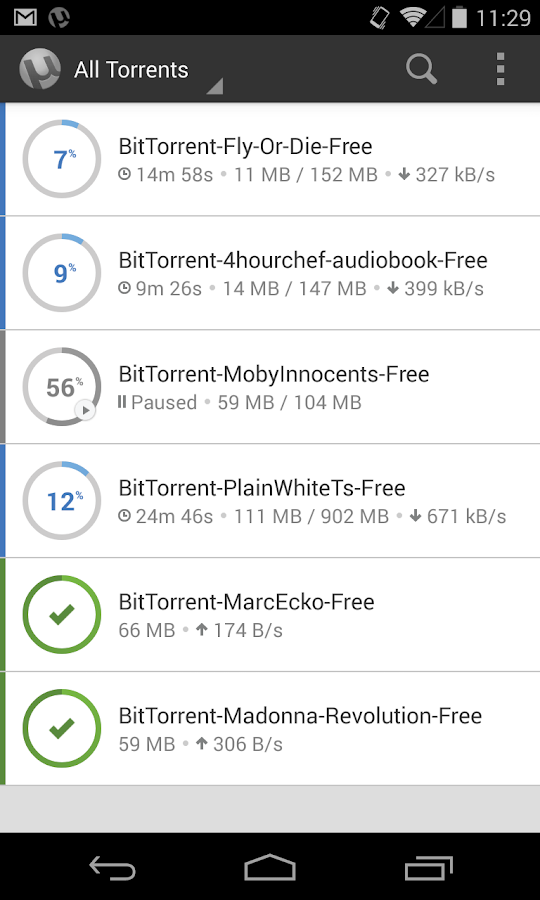
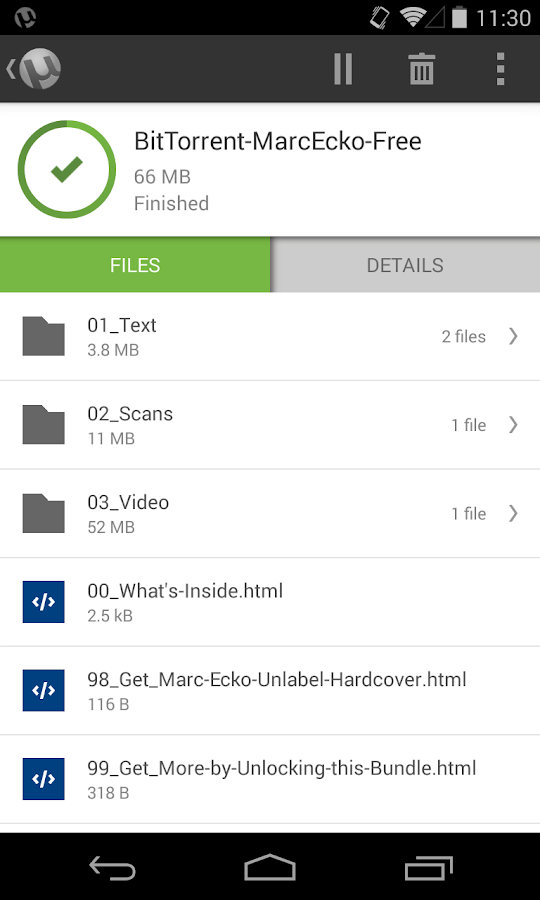
Upgrade to AD-FREE μTorrent® Pro, from the developers of the #1 torrent app in the Google Play Store, and the #1 bittorrent client on desktops worldwide.

µTorrent Pro (uTorrent Pro) is a light, powerful, AD-FREE app to help you download the stuff you love, directly to your phone or tablet. If you like the µTorrent desktop client or the μTorrent (uTorrent) app for Android, you'll love µTorrent Pro. And, because this edition of the µTorrent Android app is new to the Google Play store, you can upgrade to µTorrent Pro at a special introductory price.

Included in the Pro app:
✔ No banner ads
✔ Introductory pricing
✔ Personal support from our devs at utandroidpro@bittorrent.com If we can't get the app to work for you, we'll refund your money

The recently-updated µTorrent Pro app reflects your input: we've modernized our look, and added in top-requested features including
✔ (NEW) Beautifully simple, clean design, including unique Pro elements
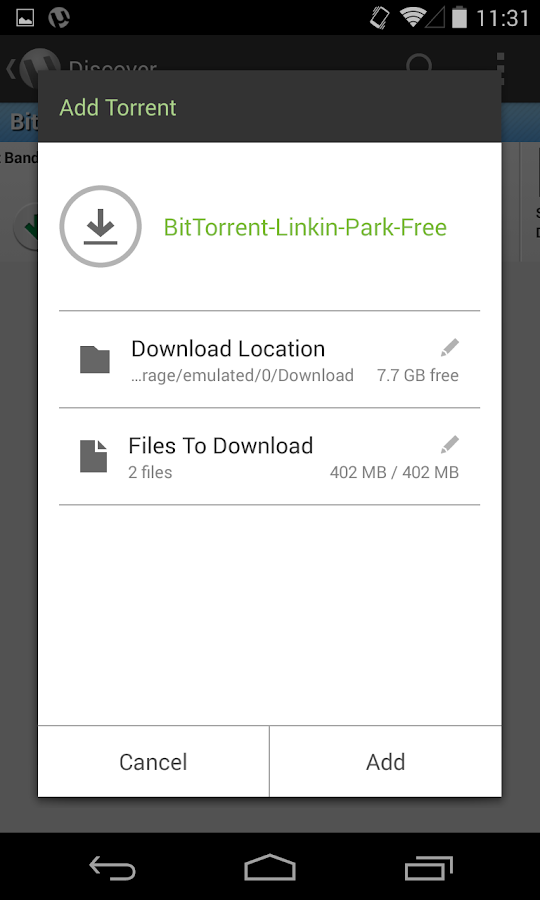
✔ (NEW) Select files within a torrent, to minimize your storage footprint
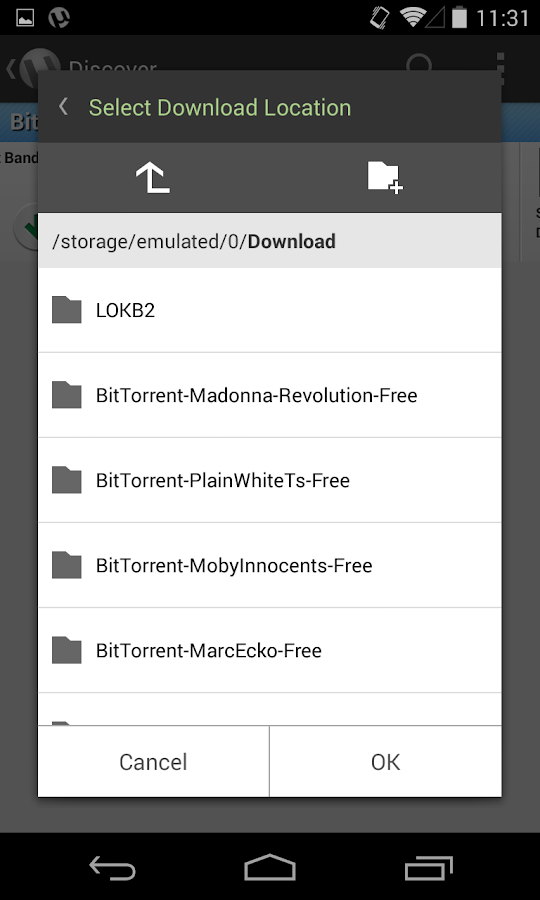
✔ (NEW) Choose your file download location, to help you stay organized
✔ (NEW) Choose between deleting torrents only, or torrents + files
✔ (NEW) Translated into Pусский, Español, Italiano, Português do Brasil
Along the way, we've improved overall performance and stability.

Standard features:
✔ No speed limits and no size limits on downloads
✔ The very latest in core torrenting technology, continuously updated by dedicated core engineers to maximize performance
✔ Wifi-only mode option to save money on your mobile data plan
✔ Access licensed content from BitTorrent's content partners from the get-go
✔ Download torrents and magnet links
✔ Downloaded more than one music file in a torrent? Play them all at once as a playlist
✔ Subscribe to RSS feeds

Screenshots:

Required OS: Requires Android 2.1 And Up

Download Link: µTorrent® Pro - Torrent App v2.06 [NOOBY].rar

NOOBY Reviewed by NOOBY on Today. µTorrent® Pro - Torrent App v2.06 Name Of The App: µTorrent® Pro https://lh3.ggpht.com/g_JHilJL2UQKYQbOAeKktKM5VqAzv2oG9JUV8MAsVqhixZbyVQWN9D2DGe4xgJJqfQ=w300 Google Play Link: µTorrent® Pro Description: Rating: 5

tTorrent Pro - Torrent Client v1.3.2 [Patched]

Name Of The App:
tTorrent - Torrent Client App

Google Play Link: tTorrent - Torrent Client App

Description:

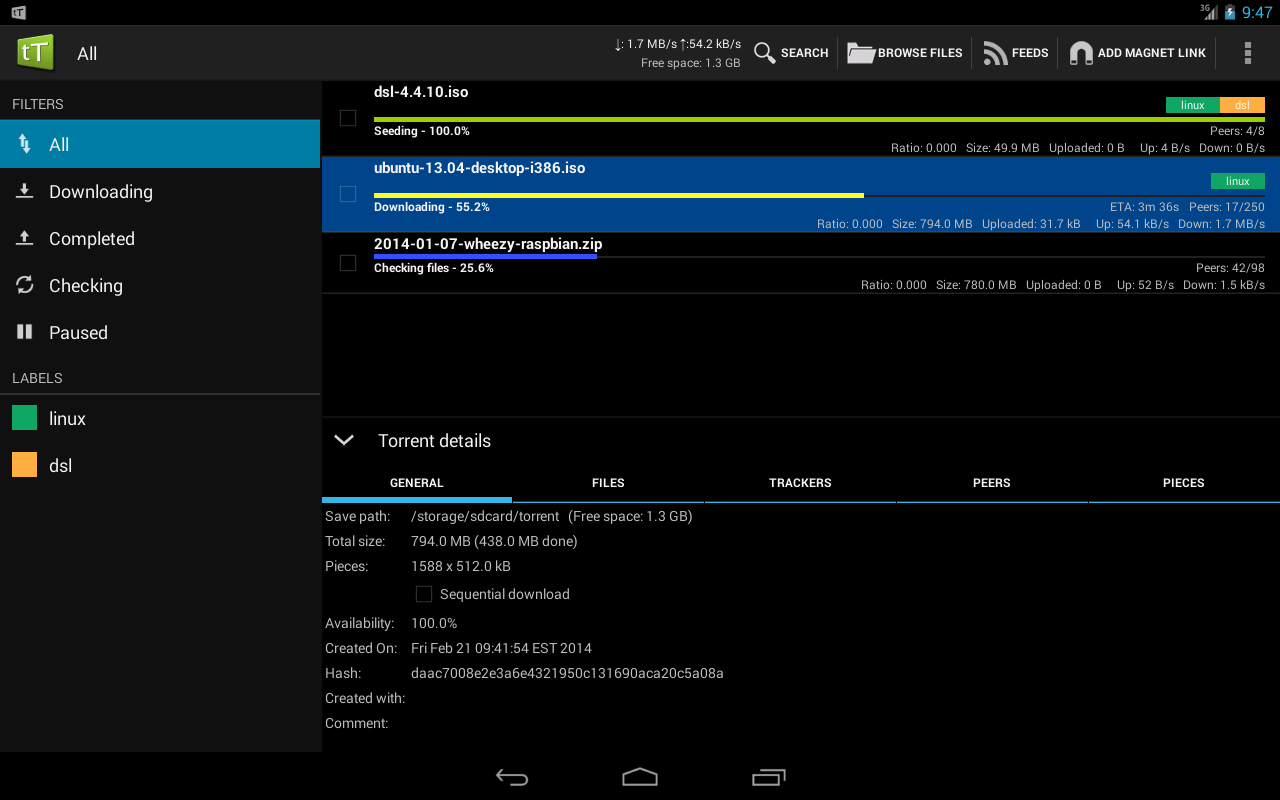
Features:
- UNLIMITED DOWNLOAD SPEED!
- chose single files for download from torrents containing multiple files
- multiple torrent downloading
- queuing
- search for torrents
- Wifi only mode, Wifi or WiMAX mode
- able to set Upload / Download speed in options
- web browser integration
- magnet link support
- trackerless torrent (DHT) support
- RSS support(automatically download torrents published in feeds)
- UPnP and NAT-PMP support
- IP filtering support
- proxy support (SOCKS, HTTP)
- encryption
- Local Peer Discovery
- creating torrents
- x86 compatibility
- Web interface
- custom label support


[Login to get rid of this advertisement]

Screenshots:

Required OS: Requires Android 2.2 And Up

Download Link: tTorrent Pro - Torrent Client v1.3.2 (Patched) [NOOBY].rar

NOOBY Reviewed by NOOBY on Today. tTorrent Pro - Torrent Client v1.3.2 [Patched] Name Of The App: tTorrent - Torrent Client App https://lh5.ggpht.com/ZwOl5wNmRkjDmCNDnJ8W3jUM-fSiPRxPbDTA1Is30GTu-RTkdW736P-ZaM7K1GqO8N8=w300 Google Play Link: tTorrent - Torrent Client App Description: Rating: 5