728x90 Ad Space

Sign Up To The Free Email Newsletter!

Want to get notified whenever we produce the latest content ? Then subscribe now to start receiving hot updates from today.

Sunday, December 2, 2012

Handy Note v4.1

Handy Note v4.1
Requirements: Android 2.2 and up/Rooted
Overview: Replace paper notebooks, but keep the same user experiences.

[break]
The most popular note taking application in Amazon app store is now available at Google Play.

After enduring tons of clumsy note applications, which were not very intuitive nor easy to use, we have created Handy Note to fulfill our needs. We developed our product to make it powerful and easy to use. Our aim is to bring a handy tool to the market that will replace paper notebooks and keep the same user experience.
The characteristics of Handy Note can be summarized in three words "Freedom, Professionalism and Convenience"

== Freedom ==
You have the possibility to navigate between numerous tools. You can input text, hand write, free draw, insert symbols, drag shapes or insert photos anytime and anywhere you want, just as you do in a blank paper.

== Professionalism ==
Handwriting experience provides by Handy Note is even better than writing on a piece of paper. The state of art design templates, note covers and papers, sticky papers, symbols to make your notes look nice.

== Convenience ==
Slide Show enables you to present your ideas without PowerPoint. You can copy and delete handwritten text word by word. Share with other Android devices or backup to Drop box.

** Product Features **
- Magic Pen: a creative technology to improve the handwriting quality. This will get you to enjoy handwriting on Handy Note more than on paper. (Samsung S Pen is supported)
- Rich Media: put text, handwriting, photos, symbols, shape on the same page just as you do in a blank paper.
- Editable handwriting box with word by word copy & delete, bulletin & numbering, alignment, and box style settings.
- Built in note & paper templates, text box & handwriting box background templates and 200 symbols.
- Share among different sizes and resolutions of Android phones/tablets of images, PDF files or Handy Note files through email, bluetooth, WIFI, Dropbox, etc.
- Ready to Use: pre-define planner, diary, meeting minutes, class note and other templates with multiple different pages. Templates have formatted text & handwriting boxes for you to start taking notes.

** Product Description **
【Content】
- Text with in place text editing, sticker style background, size, color, numbering, bullet, etc.
- Handwriting with customizable pen style, scalable writing area.
- Full screen draw with lasso selecting and style changing.
【Format】
- Multiple objects: layer changes, alignment, distribution, group/ungroup, position lock.
- Templates: place holder replaces.
- Draw & Handwrite: 5 different kinds of pens with 6 colors and 6 strokes.
- Text: 24 sticker style backgrounds, size, color, numbering, bullet, align, etc.
【Resource】
- Templates: multiple pages templates in basic, time management, diary, business, academic, personal and others categories.
- Paper & Cover: more than 20 papers/cover styles in basic, time management, diary, business, academic, personal and others categories.
- More will available from our web site
【Sharing】
- Share among different size and resolution Android phones/tablets.
- Share as image & PDF files for popular use.

What's in this version :
What's new (4.1)
1. Page event (under top-left 2nd icon)
You can schedule a page to your calendar apps, then to Google calendar.
2. Enable input method spelling check / suggestion/ prediction
A switch is in setting center. The default setting is disable the feature.
3. Improve for SPen users
- You can use fingers as an eraser
(Finger Eraser is defaulted and you can canel it in second checkbox from right on freedraw toolbar)
- You can select free drawing with/without pen pressure sensitive.

This app has no advertisements

More Info:
Code:

https://play.google.com/store/apps/details?id=com.appbody.handyNote.google
Download Instructions:Use Lucky Patcher or Modded Google Play by ChelpuS
http://ul.to/bo5gmuq8

mirror:
http://www.secureupload.eu/novh0gs4xrhi
aTorrent PRO v2.0.0.4

aTorrent PRO v2.0.0.4
Requirements: Android 2.1 and up
Overview: aTorrent - Bit Torrent Software. Download big files right to your pad or phone!

[break]
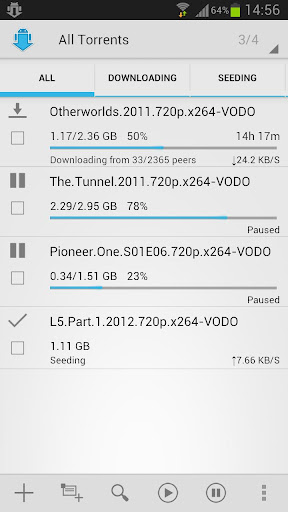
aTorrent - Bit Torrent Software. Download big files right to your pad or phone!

aTorrent PRO - Native P2P BitTorrent Software for Android devices. Download files with ease right to your phone or tablet!
Professional (Ad-free) version.

Features:
* Torrent search dialog
* Open torrents right from browser
* Magnet links support
* Add torrent from file
* Choose download folder
* Partial download (choose files from torrent)
* Multiple parallel downloading
* Option to limit downloads by Wi-Fi
* Option to pause downloads when external power supply is not connected
* Supported protocols: BitTorrent P2P, DHT, Advanced DHT Bootstrap, Magnet links, HTTP & UDP Trackers

What's in this version:
Absolutely new version. Fast speed and new UI.
You will need to add torrents again.
! If you have installed any Free RAM/Task manager application, then add aTorrent to it's exclusion list to avoid unloading from memory and stop downloading.

This app has no advertisements

More Info:
Code:

https://play.google.com/store/apps/details?id=com.mobilityflow.torrent.prof
Download Instructions:
http://ul.to/a4htdw6e

mirror:
http://rapidgator.net/file/61093525

Work Calendar v3.0.13

Work Calendar v3.0.13
Requirements: Android 2.1+
Overview: You are shiftworker or have changing working-time or schedule?
It bugs you to setup every single calendar entry according to your work schedule?
Have a look at Work Calendar!


You are shiftworker or have changing working-time or schedule?
It bugs you to setup every single calendar entry according to your work schedule?
Have a look at Work Calendar!

Work Calendar will help you to enter your shifts and work schedule in a clear, easy and convenient way.

All entries are made in an existing Google- or Exchange calendar (prerequisite)!

Setup categories that will serve as templates to be easily used when entering shifts later on. You can even combine several categories to a more complex work schedule. Different kinds of counters will help you keeping an overview of shifts, work hours or even resulting salary.

Of course, you may also use Work Calendar for other types of recurring events (hobby, sports, club-days, school, university...)

Functions:
- Categories: Name, abbreviation, description, start- and end-times, reminder/alarm, location
- Week/month view to create/modify entries in your calendar
- Agenda
- Overview: month/year summaries of work times
- Hour counters with overtime and salary
- 3 widgets with configurable design

Languages supported by Work Calendar: German, English, Turkish, Italian and Portuguese.

Note: If you want to use the widgets, you must not install the app on your SD-card. This is an Android-restriction, not a restriction of Work Calendar.

If you have problems with Work Calendar, please have a look at the FAQ and my homepage
http://sandnersoft.de/2011/07/27/arbeitskalender-faq/">http://sandnersoft.de/2011/07/27/arbeitskalender-faq/
Or send me an email.

Note: I can not reply to comments made here in the Android Market !!!

Required permissions:
• Network communication: full internet access - used for Dropbox sync, other services will follow. Lite-version: for ads.
• Your personal information: add or modify calendar events - of course used to read, modify or enter events
• Storage: modify/delete SD-card contents - to create/read backups of your data
• System tools: automatically start at boot - for the widgets
• Check market license: check if app is properly purchased

This app has NO advertisements

More Info:
Code:

https://play.google.com/store/apps/details?id=de.sandnersoft.Arbeitskalender
Download Instructions:
http://ul.to/sdbb2ehx

Mirror:
http://rapidgator.net/file/61093552/...endar.rar.html
http://www.mixrelease.com/android/wo...-apk-download/

Setting Profiles Full v1.3F

Setting Profiles Full v1.3F
Requirements: Android OS 1.6+
Overview: Phone settings auto-adjusted to your needs

[break]
* Maintain settings profiles
* Manually activate profile permanently or temporarily
* Multiple profile capable
* Automatically activate profiles based on battery conditions, locale, or rules
* Automatically start programs or tasks
* Integration with NewsRob, APNDroid, Volume Locker, Backlight Off
* Manage wireless communications and display to save battery and increase power life
* Control volume for media, mp3, notifications, and phone ringer
* Set ringtones, touchtones and vibrate
* Autopilot Airplane mode, Toggle Network, Wifi, Ringer, Bluetooth, Brightness, Silent, Screen Timeout, 4G
* On CyanogenMod: control 2G/3G, Mobile Data, WiFi Hotspot
* Conditions for Time, Day, Location GPS, Battery, Calendar, Incoming Call, Missed Call, Headset, Car/Desk Dock, BT device, Running App
* Convenient 1×1 home widget
* Notification Bar shortcut
* Plugins support

What's in this version:
v1.3
Added Holo UI theme for ICS+
Fixed vibra icon being shown if notification volume is 0 on ICS+
Reboot after upgrade

This app has no advertisements

More Info:
Code:

https://play.google.com/store/apps/details?id=com.probeez.profiles
Download Instructions:
http://ul.to/52s7hmpf

Mirror:
http://www.filedownloads.org/ffpnm1sye24t

VitalPlayer Pro v2.0.3

VitalPlayer Pro v2.0.3
Requirements: 2.1 and up
Overview: VitalPlayer supports almost all video and audio codecs.

[break]
This powerful software codecs provide smooth quality video.
----------------------------------------------------------
* Best performance on multi-core(since ver2.0.1). *
*If it can not play, please set the software codec(setting -> decode mode -> software codec or movie file long press).
** Installation error(or Unknown error -18) solution **
1. Move all the apps back to phone
2. Put your microSD into a card reader
3. Delete .android_secure folder.

- Functionality
1. System mode play(hardware codec use)
2. SMI,SRT,SUB support
3. Software & hardware Brightness control
4. Resume play previously
5. Screen color(Gray, Red, Blue, Green) (software codec only)
6. Various font size & color & type
7. Screen capture(software codec only)
8. Screen Lock/Unlock
9. Subtile Sync.
10. Streaming support(http, rtsp)
and more.

What's in this version:
1. version 2.0.3
- Menu added(Long click -> Hardware codec play)
- Screen Mirroring added(ver2.3 over)
- Control button auto hide
- Seek bug fixed
- bugs fixed

This app has no advertisements

More Info:
Code:

https://play.google.com/store/apps/details?id=com.dgobs.orgin.paid.VitalPlayer
Download Instructions:
http://ul.to/q34fpzcm

Mirror:
http://www.secureupload.eu/vcoam9uh0akl/0YWxQbGF.apk

ICS GO Launcher EX Theme v1.07

ICS GO Launcher EX Theme v1.07
Requirements: Android 1.6+
Overview: Ice Cream Sandwich (ICS) to be used with GO Launcher EX Theme. The next Android OS look and feel, but with a touch of customization. GO Launcher Ex and APEX Launcher compatible.


Ice Cream Sandwich ICS to be used with GO Launcher EX Theme

Ice Cream Sandwich (ICS) to be used with GO Launcher EX Theme. The next Android OS look and feel, but with a touch of customization. GO Launcher Ex and APEX Launcher compatible.

Credits:
Icons made by (johnny quest)
http://forum.xda-developers.com/show....php?t=1117986

.-===[ REQUIREMENTS ]===-.

Newer version of application (GO Launcher EX) or (APEX Launcher) installed to apply the theme. This application is free and available in Google Play Store by (GO DEV Team).

.-===[ APP2SD CARD ]===-.

Yes. Must have Android OS 2.2 (Froyo) or Up.

.-=[ APPLYING THE THEME ]=-.

1) In GO Launcher EX press the phone menu button;
2) Select the THEME option;
3) From the Theme listing select the theme you´ve just download and installed;
4) Select APPLY;

.-=[ APPLYING THE WALLPAPERS ]=-.

1) In GO Launcher EX press the phone menu button;
2) Select the Wallpaper option;
3) Select the ICS Wallpapers option;
4) Select desired wallpaper and click Set Wallpaper;

.-=[ APPLYING THE CUSTOM FONT STYLE ]=-.

1) In GO Launcher EX press the phone menu button;
2) Select the Preferences option;
3) Select the Visual Settings option;
4) Select the Font option;
5) Select the Scan Font option;
5) Select the FONT and Choose the Roboto [Theme ICS GO launcher EX];
6) Ready, now enjoy a new font style for your Icre Cream Sandwich theme.

.-=[ MORE FROM DEVELOPER ]=-.

Click on my Name profile to view all my Android APPs available.

.-=[ CUSTOMMER SUPPORT ]=-.

If you need any help with this APP or wish to contact me, send me an email. I try to reply emails daily, if not possible I´ll reply in no more than 48hs. I do not reply emails in weekends, emails are replied from Monday - Friday.

.-=[ ABOUT REFUNDS ]=-.

Refunds are available for 15 minutes, if you wish to cancel the order do it during this time. If this is a free theme or APP you can cancel and try again several times. If it´s a paid application and you cancel it, the second time you order it no refund will be available.

.-=[ DOWNLOADS ARE NOT COMPLETING? ]=-.

Please, sometimes the Android Market servers becomes really slow with so many requests, if this happen you can try another time. I have no control over this issue. Some patience is required when it happens.

.-=[ COMMENTS AND RATINGS ]=-.

To help other customers, your comments and ratings are welcome and I apreciate it. Also, if you need any assistance, please contact me first before posting offensive comments. It´s better to have a help from a developer than avoid him and leaving negative public feedbacks.

.-=[ UPDATES ]=-.

All my themes are updated on a regular base to improve the theme with new features like more icons, wallpapers, etc. Requests for new icons are welcome.

This app has NO advertisements

More Info:
Code:

https://play.google.com/store/apps/details?id=com.gau.go.launcherex.theme.ics4
Download Instructions:
http://ul.to/nf63uelf

Mirror:
http://rapidgator.net/file/61092343/...Theme.rar.html
http://www.mixrelease.com/android/ic...-apk-download/

SMPL White Theme Go/Nova/Apex v1.6

SMPL White Theme Go/Nova/Apex v1.6
Requirements: Android 2.0+
Overview: this is the first go theme that got rid of the background for an even more mnml experience. My goal was to create uber minimal white icons and hopefully I delivered.


:: if you have problems and are running jellybean make sure to install the latest nova launcher and apex launcher beta! that should fix things up for you :+D

:: this is the first go theme that got rid of the background for an even more mnml experience. My goal was to create uber minimal white icons and hopefully I delivered.

::> this theme features <::
:: includes 600+ beautiful icons to pick and choose from
:: over 1300 icons themed
:: supports go launcher : apex launcher : nova launcher
:: include beautiful full go theme.
:: long time support, responsive themer
:: will add more features as I learn :D
:: download clock by fashionon :: http://tinyw.in/9ziL

:: install go launcher
:: go to home screen :: press menu button :: click on themes :: choose Simple White :: apply

:: install on nova launcher
:: go to nova settings :: click on "look and feel" :: click on "icon theme" :: choose "Simple White".

:: install on apex launcher
:: go to apex settings :: click on "theme settings" :: click on "Simple White" :: make sure "icon pack" "skin" and "Wallpaper" ared checked :: apply

:: install on atom launcher
:: go to home screen :: touch and hold a clear spot on the launcher :: wait till a blue box pops up :: press theme settings :: scroll to "Simple White" :: apply

This app has NO advertisements

More Info:
Code:

https://play.google.com/store/apps/details?id=com.gau.go.launcherex.theme.smplwhite
Download Instructions:
http://ul.to/a1zt6y6b

Mirror:
http://rapidgator.net/file/61091098/...White.rar.html
http://www.mixrelease.com/android/sm...-apk-download/